
Odoo HR Dashboard: How to Track Employee Attendance, Leave and Productivity KPIs
Muhammad Haroon
Quick Answer:
| An Odoo HR dashboard is one screen that brings together live data from Odoo Employees, Attendances, Time Off, and Timesheets. It shows important HR information through KPIs, charts, and tables. Common KPIs include attendance rate, late check-ins, overtime hours, absenteeism, leave balances, and leave usage. Odoo already stores this data but the reports are spread across different apps. A dashboarding tool like Odoo Dashboards brings everything together on one screen without using spreadsheets or needing a developer |
|---|
What Is an Odoo HR Dashboard?
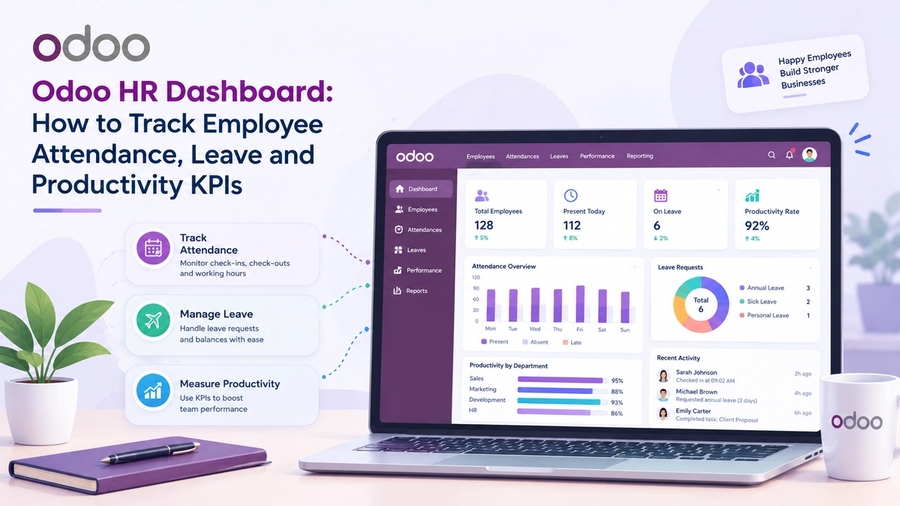
An Odoo HR dashboard is a visual screen that brings your employee data together in one place. Instead of opening Attendances, Time Off, and Timesheets separately and exporting reports to Excel, you can see the most important HR numbers on one screen.
Odoo does not have one single HR dashboard that combines data from all HR apps. Each app has its own reports and focuses on different information. An HR dashboard brings these reports together so you can see the bigger picture. For example, you can compare overtime with leave or check whether a department has high absence and low employee utilization.
Odoo also has its own Dashboards app for creating interactive dashboards with real-time data from your Odoo database. Third-party dashboard tools can provide additional features and flexibility.
Why HR Teams Need One
Most HR problems show up in the data before they become serious. Three common examples are:
- Attendance problems grow slowly. Late arrivals are common and can increase by a few minutes each day. Over time, this can leave teams short-staffed in the morning.
- Unused leave builds up. Employees can keep large leave balances until the end of the year which can lead to many people taking time off at the same time.
- Workloads become uneven. Some employees can work overtime every week while others have extra capacity. This can be difficult to see when the data is spread across different reports.
An HR dashboard helps you find these patterns early. You don't need to wait for someone to report a problem, HR teams can use the data to see what is changing and take action sooner.
Where the HR Data Lives in Odoo
Before choosing KPIs it is important to know which app supplies which data. Based on Odoo's official documentation:
| Odoo App | What it Records | Useful for |
|---|---|---|
| Employees | Employee records, departments, managers, work schedules | Grouping and filtering every other KPI |
| Attendances | Check-in and check-out times, worked hours, overtime | Attendance and punctuality KPIs |
| Time Off | Time off types, allocations, requests, approvals, balances | Leave KPIs |
| Timesheets | Hours logged against projects and tasks | Productivity and utilization KPIs |
| Payroll (Enterprise) | Work entries built from attendance, planning and time off | Payroll-ready hours |
Three details from Odoo’s documentation are important when building an HR dashboard:
- Attendance works like a time clock. Employees can check in and out through Odoo or a kiosk. If Absence Management is enabled, the system can also record unplanned absences, such as no-shows, in attendance reports.
- Overtime may need approval. Odoo sends records that need review like overlapping entries or incomplete shifts, to a management view. Approved overtime can also be converted into time off.
- Approved leave can affect timesheets. Odoo can automatically create timesheet entries for approved time off when the option is enabled. This means your utilization calculations should not treat approved leave as unworked time.
Attendance KPIs to Track
Attendance KPIs show you if employees are working their scheduled hours and when they are working.
Attendance Rate
Formula: (Days attended ÷ Scheduled working days) × 100
Shows how regularly employees attend work. Track it by month and department.
Late Check-In Rate
Formula: (Late check-ins ÷ Total check-ins) × 100
It tracks how often employees are late and helps find common patterns.
Average Worked Hours
Formula: Total worked hours ÷ Total days attended
Compare this with scheduled hours to see if employees are working as expected.
Overtime Hours
Formula: Total hours worked above scheduled hours
Regular overtime can show heavy workloads or a need for more staff.
Incomplete Attendance Records
Formula: Records with check-in but no check-out ÷ Total records
Helps find missing check-outs and keeps attendance data accurate.
Unplanned Absence Count
If you have Absence Management turned on, you can record unplanned absences separate from approved leave to better understand unexpected no-shows.
Leave and Time Off KPIs to Track
Leave KPIs show who is away, how much leave is left, and how leave is being used.
Absenteeism Rate
Formula: (Total days absent ÷ Scheduled working days) × 100
Track all absences or only unplanned ones but use the same method in every report.
Leave Balance
Odoo tracks each employee’s available and remaining leave. Group employees into:
- High balance: Can lead to a year-end leave rush.
- Normal balance: Leave is being used steadily.
- Low or zero balance: Leave has been used quickly.
Leave Utilization Rate
Formula: (Leave days taken ÷ Leave days allocated) × 100
Shows how much of an employee’s available leave has been used.
Leave by Type
See the most used leave types by employees such as annual leave, sick leave, unpaid leave, and other leave.
Chart: Donut or stacked bar.
Pending Approvals
Track the number of pending requests and the average time to approve. Managers can act quicker with a waiting more than 3 days metric.
Team Availability
Provide a report of who is on leave this week by department so managers can plan team coverage.
Bradford Factor (Optional)
Formula: S² × D
It is useful to identify trends of regular short absences. Use it for tracking patterns, not as an automatic disciplinary measure.
Productivity KPIs to Track
Productivity KPIs help HR understand workload, capacity, and how employees spend their time. The main metrics include:
- Utilization rate: Shows how much available work time is being used.
- Billable vs. non-billable hours: Shows how much time can be billed to clients.
- Timesheet completion rate: Tracks whether employees submit timesheets on time.
- Attendance-to-timesheet gap: Compares recorded attendance with logged work hours.
- Overtime-to-headcount ratio: Compares overtime with team size.
- Hours by project or department: Shows where employees are spending their working time.
How to Build Your Odoo HR Dashboard
- Step 1: Know your users: Consider who will be using it and what they need to see.
- Step 2: Validate your data: Check that employee, attendance, leave, and timesheet data are correct.
- Step 3: Establish your KPIs: Start with 8-10 key metrics like attendance, overtime, leave, utilization.
- Step 4: Connect your data: Bring data from Employees, Attendances, Time Off and Timesheets together in one dashboard.
- Step 5. Add charts and tables: Use KPI cards for numbers that matter, line charts for trends, bar charts for comparisons, tables for details.
- Step 6: Add filters: Add filters Add filters for date, department, manager and company.
- Step 7: Enable drill-downs: Let users click a KPI or chart to view the related Odoo records.
- Step 8: Set permissions: Give users access only to the HR data they need.
- Step 9: Review and improve: After a few weeks, remove unused KPIs and add metrics that managers actually need.
Native Odoo Reports vs. Odoo Dashboards
- Native Odoo reports: Display data from just one app at a time, so you need to switch between different reports .
- Odoo Dashboards: Gather all your Odoo app data into one location.
- Cross-app KPIs: Native reports need export or manual work while dashboards can combine the data automatically.
- Filters: Native reports have app-specific filters, dashboards can have global filters across multiple KPIs.
- Drill-downs: Click on a chart or KPI in a dashboard to open the corresponding Odoo records.
- Customizability: Native reports require technical resources to make complex changes while dashboard tools can be customized with no coding.
In short, Native Odoo reports work well for simple and app-specific questions. An Odoo Dashboards is more useful when you want to combine HR data from different apps and see the full picture in one place.
Ready to build yours? Explore Odoo Dashboards to create a live HR dashboard inside your Odoo instance with no code, no exports and no waiting on developers.
See Odoo Dashboards in action
Start a free 7-day trial and build your first dashboard in minutes — or book a walkthrough and we'll show you how your team would use it.