
What Is an Odoo Dashboard? A Beginner-Friendly Guide for Business Owners
Muhammad Haroon
Running a business today is not an easy task due to the highly competitive market and managing millions of moving parts, including sales, inventory, finances, customer relationships, marketing campaigns, and the list goes on. And if you try to track all of that using spreadsheets or disconnected systems, you'll get frustrated quickly, and all your work will be messed up. Here, you need a system that helps you to manage all your operations in one place. And there’s no better option than Odoo dashboards.
If you’ve ever wished you could open one screen and instantly know how your business is performing, you’re in the right place. Let’s discuss everything you need to know about Odoo dashboards so you take the right step at the right time.
What Is an Odoo Dashboard?
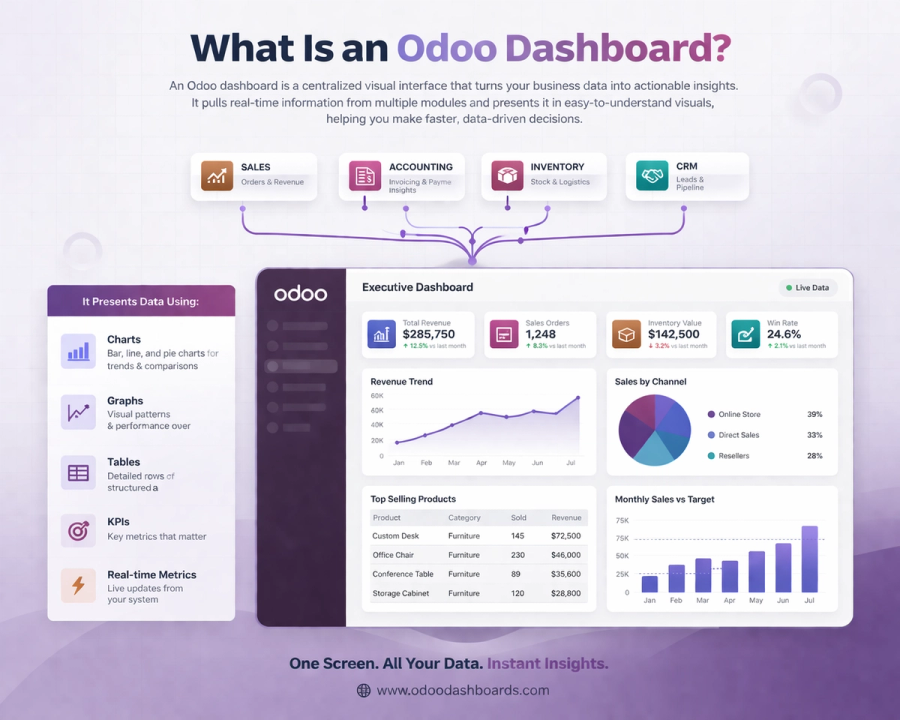
An Odoo dashboard is a visual control center for your business.
Consider it just like the dashboard in your car. You don’t need to open the engine to know your speed, fuel level, or warnings; you just glance at the screen. An Odoo dashboard works the same way, but for your business data.
It pulls information from different parts of your system, like sales, accounting, inventory, CRM, and presents it in a visual format using:
- Charts
- Graphs
- Tables
- KPIs (Key Performance Indicators)
- Real-time metrics
Everything you require is in front of you, saving you the trouble of searching through spreadsheets or reports.
Why Odoo Dashboards Matter for Business Owners
Data is everywhere, but insights are what actually matter. Odoo dashboards turn raw numbers into meaningful insights so you can make smarter decisions faster.
Let’s show you why business owners love them:
You Get Real-Time Insights
No more waiting for end-of-month reports. Odoo dashboards update in real time, so you always know what’s happening right now.
Everything Is in One Place
Sales, finance, inventory, HR—everything connects inside Odoo. Your dashboard brings it all together into one unified view.
Faster Decision-Making
When you can see trends instantly, you don’t have to guess. You can act quickly and confidently.
Easy to Understand
Even if you’re not a “numbers person,” visual dashboards make data easy to understand.
Fully Customizable
Every business is different, and Odoo dashboards can be tailored to match your exact needs.
Key Features of Odoo Dashboards
Odoo dashboards not just contain charts but it’s a powerful tool that is designed to simplify how you can run your business.
Let’s see the features that make them so useful.
Real-Time Data Visualization
One of the biggest advantages is real-time data.
Whether it’s:
- Today’s sales
- Pending invoices
- Inventory levels
- Customer activity
You’ll see everything as it happens.
This is especially helpful for time-based businesses where delays can cost money.
Customizable Dashboard Layouts
Not every business owner cares about the same metrics.
With the Odoo custom dashboard, you can:
- Add or remove widgets
- Rearrange sections
- Highlight key KPIs
- Focus on what matters most to you
For example:
- A sales manager can monitor pipeline and revenue.
- Stock levels are the main concern of a warehouse manager.
- A CEO considers total performance.
Interactive Reports and Filters
Odoo dashboards aren’t static.
You can:
- To get further into specifics, click on charts.
- Use filters such as team, date, product, etc.
- Quickly switch between viewpoints
This implies that you are exploring the data rather than merely seeing it.
Integration Across All Odoo Apps
Odoo is an all-in-one ERP system, which means your dashboard connects to everything:
- CRM
- Sales
- Accounting
- Inventory
- HR
- Manufacturing
- Marketing
This integration makes sure that your dashboard provides you with a comprehensive view of your company rather than simply isolated data.
KPI Tracking
KPIs are a major component of your business that helps you grow.
Odoo analytics dashboard let you track metrics like:
- Revenue growth
- Conversion rates
- Profit margins
- Customer acquisition cost
- Inventory turnover
You can set targets and monitor performance against them.
Automated Reporting
Forget manual reports that are difficult to generate and maintain.
Odoo dashboard reporting can:
- Automatically generate reports
- Update metrics in real time
- Save you hours of work every week
Types of Odoo Dashboards You Should Know
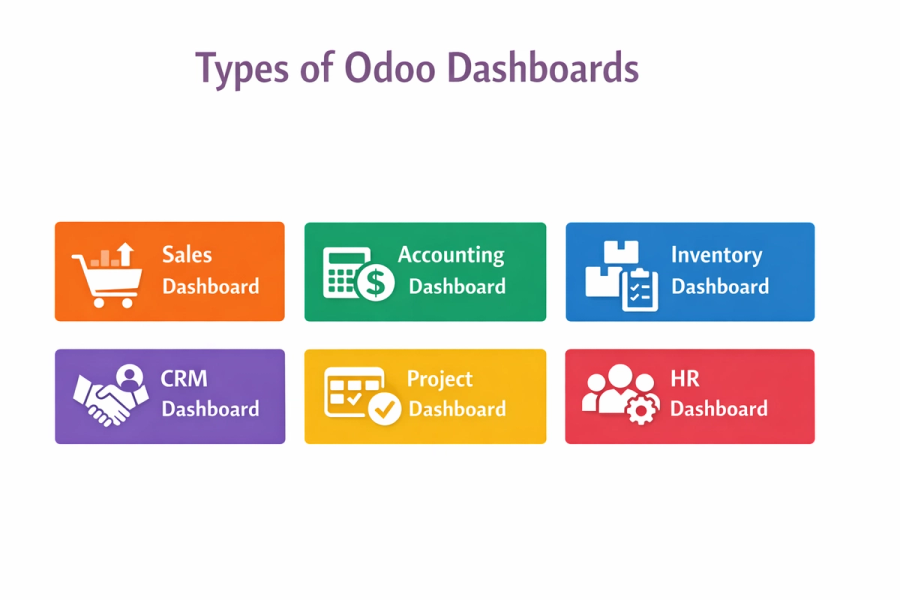
Odoo business dashboards are particularly useful because different teams inside your company don't view the same data. They can be customized to meet the objectives of each department, providing everyone with the insights they genuinely require rather than just a collection of random data.
Let’s see the most commonly used Odoo dashboards and how they help in real-world business scenarios.
Sales Dashboard
If growth is your main focus, as most businesses have, the Odoo Sales Dashboard is where you’ll spend a lot of your time.
It shows you a complete picture of how your sales engine is performing. Instead of waiting for weekly or monthly reports, you can see what’s happening right now.
It typically shows:
- Sales performance by day, week, or month
- Revenue trends and growth patterns
- Top-selling products or services
- Sales team performance and individual targets
- Conversion rates from leads to closed deals
Not only this but it can also help you to find the patterns.
For instance, you can increase sales of a product if it suddenly starts to outperform others. Alternatively, if a sales representative is outperforming the others, you can examine their unique approach and duplicate it.
To put it briefly, this dashboard helps you sell more smartly rather than harder.
Accounting Dashboard
Finance is one area where you really can’t afford a mistake or a guess.
You can have a detailed picture of your company's financial situation at any time with the Odoo Accounting Dashboard, which functions as your financial management panel.
You can monitor:
- Cash flow (the difference between what comes in and goes out)
- Summaries of profits and losses
- Unpaid debts and outstanding invoices
- Spending patterns and business expenditures
- Reconciliations and bank balances
This dashboard's power to identify issues early on is what makes it so useful.
For example:
- If there are too many past-due bills, then it's time to check in.
- And if costs increase more quickly than income, then you might have to make expense reductions.
You act right now rather than waiting to respond. It functions similarly to having a financial advisor integrated into your system.
Inventory Dashboard
If your business deals with physical products, the Odoo Inventory Dashboard is absolutely essential.
Managing stock manually or through spreadsheets can quickly turn into losses. While stockouts can negatively impact sales, overstocking can affect your finances.
With this dashboard, you can see in real time:
- Current stock levels at each warehouse
- Reorder points and low inventory notifications
- Efficiency and performance of warehouses
- Product movement (things that move quickly vs those that move slowly)
One of the biggest advantages here is predictive control. Which means you can identify:
- Which products are about to run out
- Which ones are sitting idle
- When to reorder and in what quantity
This helps you keep the ideal balance, enough inventory to satisfy demand without negatively impacting your profits.
CRM Dashboard
Your customers are the main asset of your business, and the Odoo CRM Dashboard helps you manage those relationships more effectively.
Everything is arranged in one location rather than managing spreadsheets, notes, and emails.
Usually, this dashboard monitors:
- Ongoing prospects and fresh leads
- Stages of the sales pipeline, such as new, qualifying, proposal, and closed
- Communication history and customer interactions
- Conversion rates at every funnel stage
The most powerful thing is how it helps you understand your sales pipeline.
You can quickly see:
- Where deals are getting stuck
- Which stage needs improvement
- How close you are to hitting your targets
This means fewer missed opportunities and more closed deals.
Project Dashboard
If you run a service-based business or manage teams working on projects, the Odoo Project Dashboard works best here.
It gives you a clear overview of how your projects are progressing without needing constant updates from your team.
You can track:
- Progress and completion rates of the project
- Upcoming milestones and deadlines
- Allocation of resources (who is working on what)
- Rates of task completion and bottlenecks
This helps you stay on top of everything without micromanaging.
For example:
- If a project is falling behind, you’ll know immediately
- If a team member is overloaded, you can redistribute tasks
It’s all about keeping projects on track and clients happy.
HR Dashboard
Managing people is just as important as managing numbers and the Odoo HR Dashboard makes it a lot easier.
You receive a centralized picture of your workers rather than having to go through HR files or other resources.
You can monitor:
- Records of employee attendance and leave
- Evaluations and performance metrics
- Hiring progress and recruitment pipelines
- Salary insights and payroll summaries
You can make smarter HR decisions with the help of this dashboard.
For instance:
- High absenteeism means it's time to investigate.
- The slow hiring process means you might need to optimize recruitment.
It ensures your team stays productive, engaged, and well-managed.
How Odoo Dashboards Work?
Now you must like all these features but the next thing that comes to your mind is how it actually works behind the scenes? Don't worry, it's very simple.
- Data Collection
Odoo pulls data from all the modules you’re using, including sales, accounting, inventory, CRM, and more.
- Data Processing
The system organizes and structures that data so it makes sense.
- Visualization
It turns raw data into charts, graphs, and KPIs that are easy to understand.
- User Interaction
You can click, filter, and drill down into specific details whenever you want.
The most interesting thing is that all of this happens automatically in real time so you don't need any manual effort.
Benefits of Using Odoo Dashboards for Your Business
Now it’s time to show you what you actually gain using Odoo dashboards in your day-to-day operations.
Better Decision-Making
When you have accurate and real-time data in front of you, decision-making becomes a whole lot easier.
You may make decisions based on facts rather than gut feelings or out-of-date information.
Every time you introduce a new product, modify pricing, or scale operations, you make well-informed decisions.
Improved Productivity
Manual reporting takes a lot of time. With Odoo dashboards:
- Reports are generated automatically
- Data is always up to date
- Teams spend less time compiling information
This frees up your team to focus on growing the business, which is more important.
Increased Transparency
When everyone has access to the same data, there’s no confusion.
Teams can:
- Track their performance
- Understand company goals
- Stay aligned with business objectives
This creates a culture of accountability and clarity across your organization.
Cost Savings
Time is money and dashboards help you save both.
By automating reporting and reducing manual work, you can reduce:
- Administrative costs
- Errors caused by manual entry
- Time spent on repetitive tasks
Over time, these savings really add up.
Scalability
As your business grows, your data becomes more complex.
The great thing about Odoo dashboards is that they grow with you.
You can:
- Add new modules
- Track additional KPIs
- Customize dashboards for new teams
Whether you’re a small startup or a growing enterprise, your dashboard evolves alongside your business.
Who Should Use Odoo Dashboards?
The short answer is almost every business.
They are particularly helpful for:
- Owners of small companies
- Startups
- eCommerce companies
- Manufacturers
- Service providers
- Enterprises
Dashboards can be useful if you depend on data, which you most likely do.
Final Thoughts:
If you are running a business and need a quick solution to manage all your tasks, you need Odoo dashboards. It helps you to turn your complex operations into simple and manageable tasks. The Odoo Dashboards is a preferred choice for those looking to grow their company and move forward with confidence.
See Odoo Dashboards in action
Start a free 7-day trial and build your first dashboard in minutes — or book a walkthrough and we'll show you how your team would use it.