

Receivables ageing
An ageing table answers the credit controller’s first question: who owes us money, and how late is it? Each row is a customer. The columns split what they owe by how many days it is past the due date, and colours draw the eye to the late buckets.
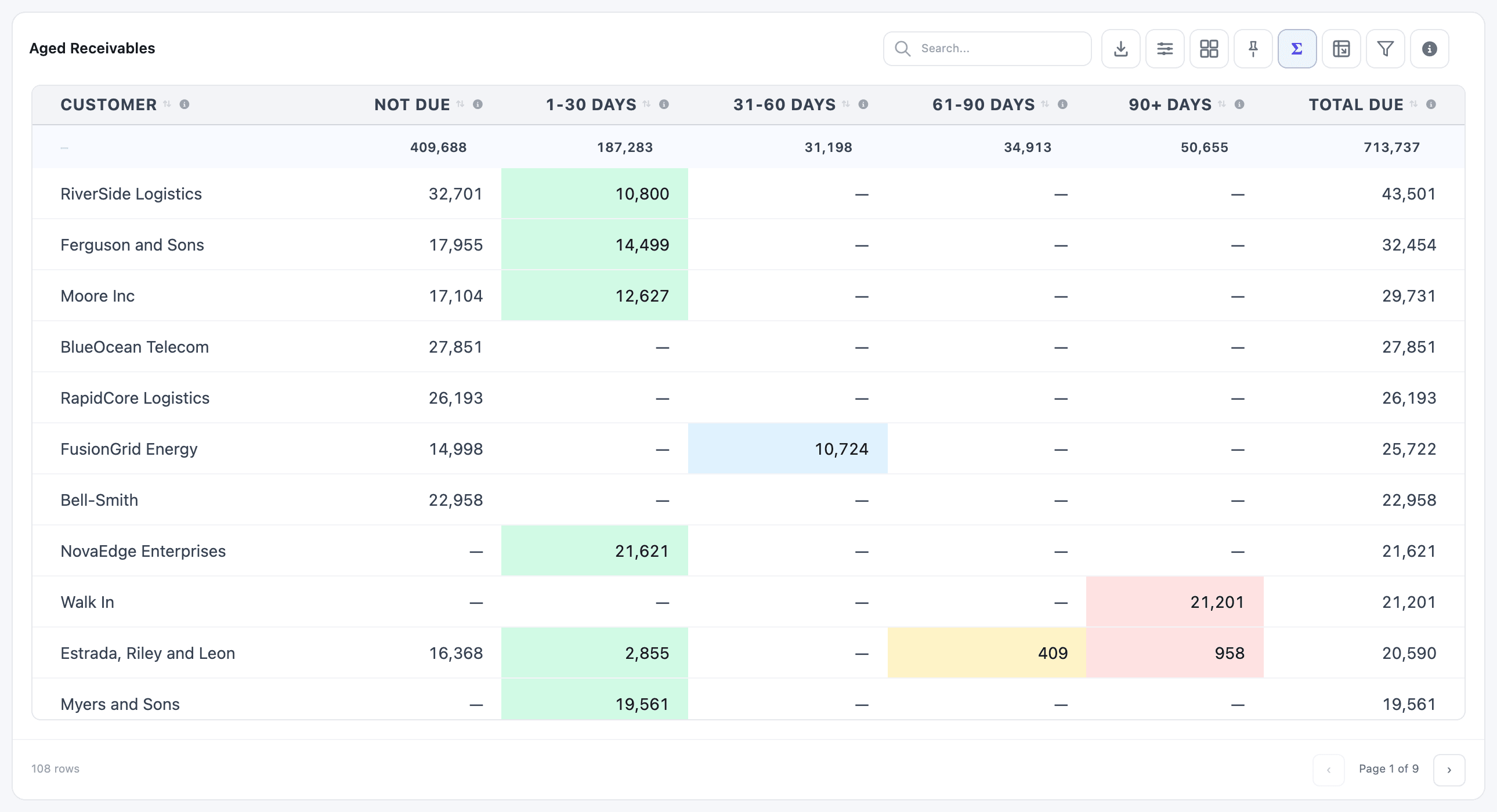
The Receivables Ageing table on the Invoicing & Receivables dashboard is the same idea per sales team instead of per customer.
1. The dataset
Section titled “1. The dataset”You need one row per open customer invoice with its customer, due date and amount still due. Create a dataset called Open Customer Invoices on the Journal Entry model (account.move), with these columns:
| Field Name | Alias | Where Clause | Clause Value |
|---|---|---|---|
id |
id |
||
name |
invoice_number |
||
partner_id.name |
customer |
||
invoice_date |
invoice_date |
Total Till Date (TTD) | |
invoice_date_due |
due_date |
||
amount_residual |
amount_due |
Is greater than | 0 |
move_type |
move_type |
Is equal to | out_invoice |
state |
status |
Is equal to | posted |
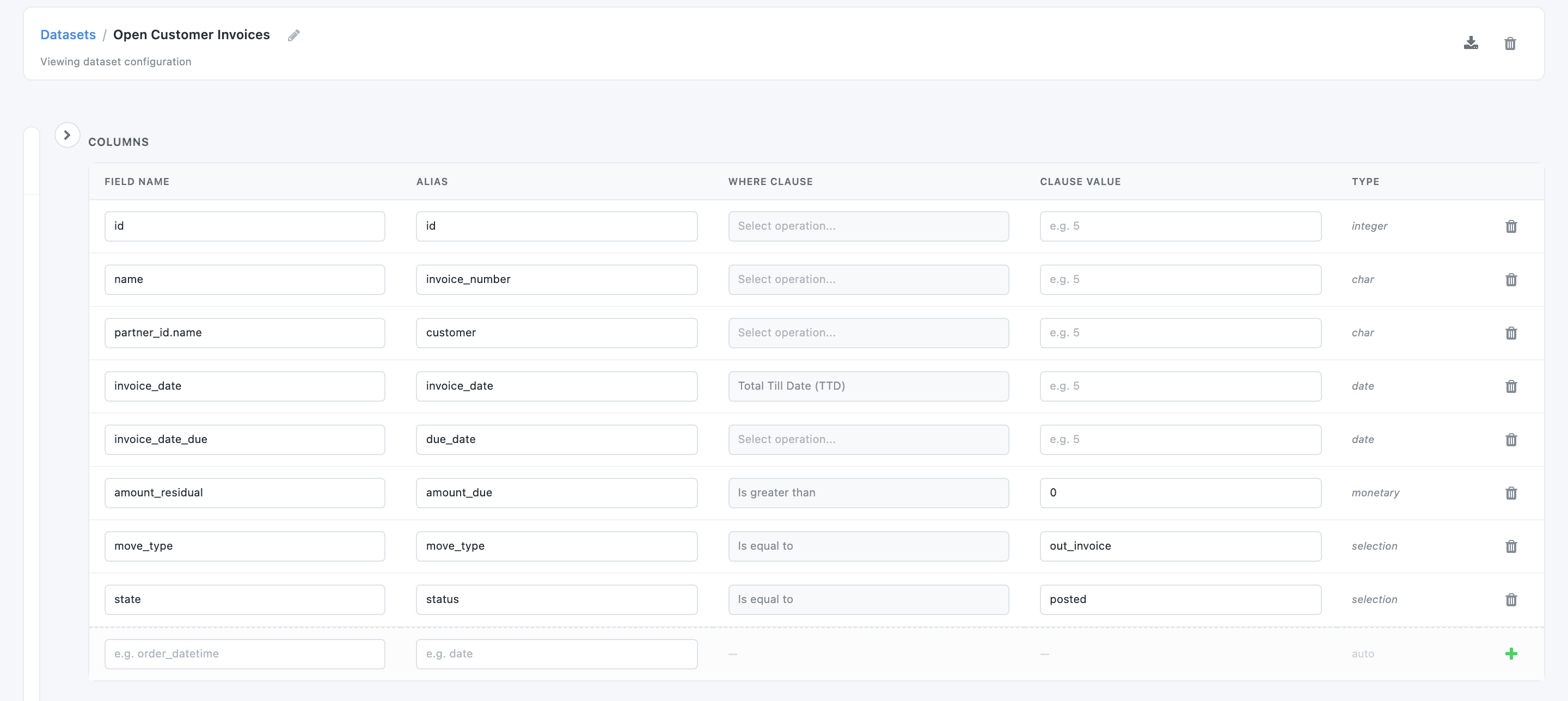
The four Where Clauses keep posted customer invoices that still have something to pay and are dated today or earlier. Every widget built on the dataset inherits them, so an Amount Due tile on it is one click: Sum of amount_due.
2. The table
Section titled “2. The table”-
In the Dashboard Builder, click New Item, name it Aged Receivables, and pick Table and Open Customer Invoices.
-
On the Configuration tab, add these columns. Pick customer from the list; type each other expression in the Field box and press Enter:
Alias Field Customer customerNot Due SUM(CASE WHEN due_date >= CURRENT_DATE THEN amount_due ELSE 0 END)1-30 Days SUM(CASE WHEN CURRENT_DATE - due_date BETWEEN 1 AND 30 THEN amount_due ELSE 0 END)31-60 Days SUM(CASE WHEN CURRENT_DATE - due_date BETWEEN 31 AND 60 THEN amount_due ELSE 0 END)61-90 Days SUM(CASE WHEN CURRENT_DATE - due_date BETWEEN 61 AND 90 THEN amount_due ELSE 0 END)90+ Days SUM(CASE WHEN CURRENT_DATE - due_date > 90 THEN amount_due ELSE 0 END)Total Due SUM(amount_due) -
Set Group By to customer. Type
SUM(amount_due)in Order By, press Enter, and tick Order Descending, so the biggest debtors come first. -
Format each amount column (gear → Format): Number, 0 Decimal places, and
—in Show for zero and Show for empty values. A dash reads faster than a column of zeros. -
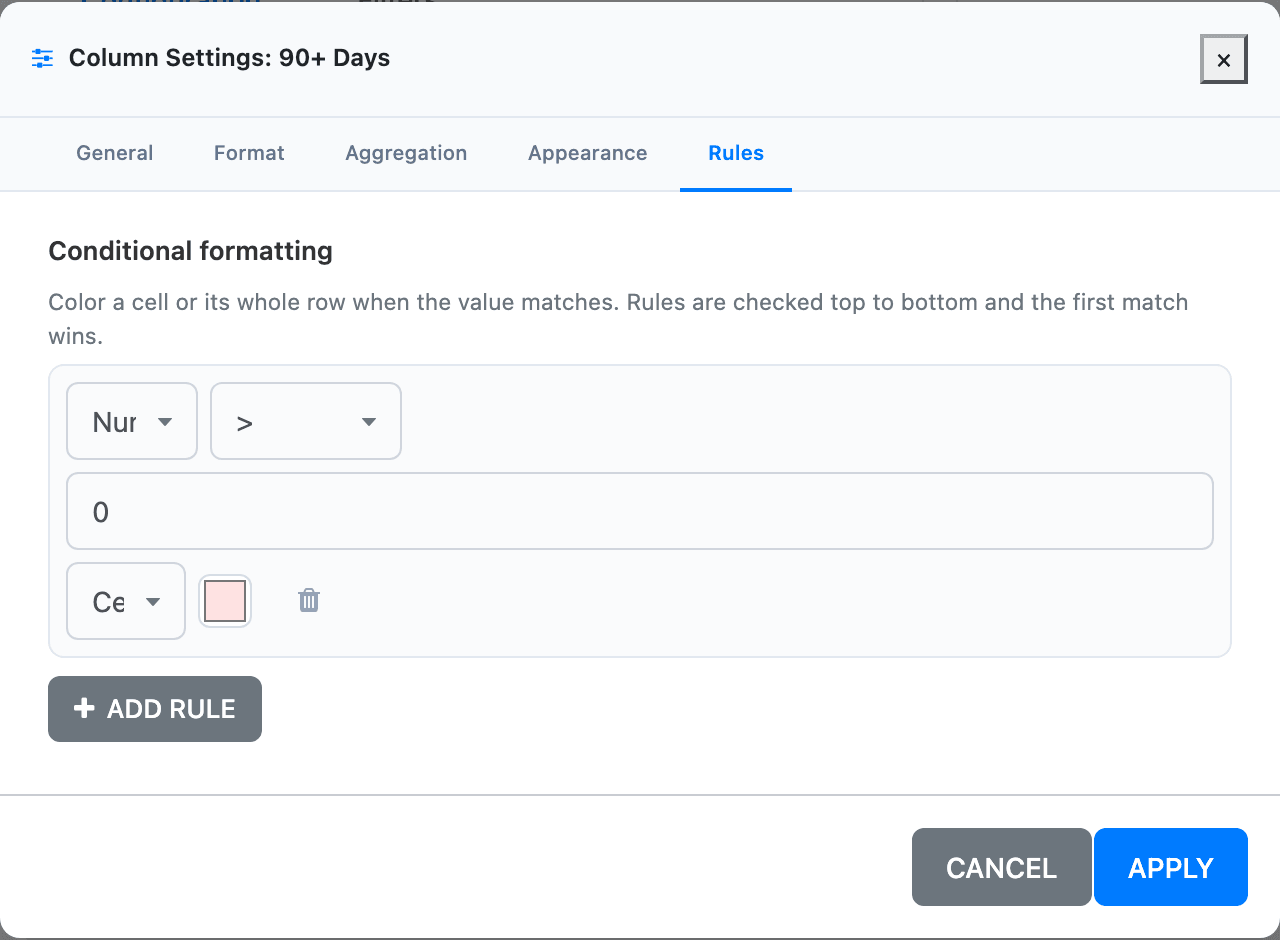
Colour the buckets (gear → Rules → + Add rule): Number, >,
0, scope Cell, and a colour per bucket. This recipe uses green for 1-30 Days, light blue for 31-60, amber for 61-90 and red for 90+. -
Under Advanced, tick Show Totals. Leave the Filters tab empty: the table is “as of today”, whatever date someone picks on the dashboard.
-
Click Save & Preview.
Why it works
Section titled “Why it works”due_dateis a date column, soCURRENT_DATE - due_dateis a whole number of days. Each bucket is aSUM(CASE …)that adds the amount due only when the days late fall in its range, and 0 otherwise. The buckets never overlap, so they add up to Total Due.- The rule tests the raw value, not the dash on screen. A bucket with nothing in it is 0, which isn’t greater than 0, so it stays white.
- Show Totals adds a row under the header that sums each column over every customer, on every page.
The totals match the Receivables Ageing table on the Invoicing & Receivables dashboard, which splits the same 713,737 by sales team.
Variations
Section titled “Variations”- More buckets. Split 90+ into 91-120 and 120+ with
BETWEEN 91 AND 120and> 120, and colour 91-120 orange. - Ageing by salesperson or team. Add the salesperson to the dataset (
invoice_user_id.partner_id.name) and group by it instead of the customer. - Over 90 % column. Share of the amount due that is more than 90 days late:
ROUND((100.0 * SUM(CASE WHEN CURRENT_DATE - due_date > 90 THEN amount_due ELSE 0 END) / NULLIF(SUM(amount_due), 0))::numeric, 1), formatted as Percentage with Multiply by 100 off. Colour bands: under 10 green, 10 to 30 amber, over 30 red. - Drill into the invoices. Under Drilldown Options, tick Enable Drilldown with Drilldown Field
id. Clicking a customer then opens their open invoices. See Drilldown.
Related: Column formats, Conditional formatting, Totals and % of group.