

Store Results
A normal dataset runs its query every time a widget asks for data. That’s what keeps it live, but a heavy query (millions of order lines, several joins, aggregates over years) runs again for every widget on every page load.
Store Results keeps a stored copy of the dataset’s rows instead. A background job rebuilds the copy on a schedule, and widgets read the copy. They load fast and the server does the heavy work once per refresh, not once per viewer. The price: figures lag by up to the refresh interval.
When to use it
Section titled “When to use it”Use it when a dataset is slow and its figures don’t need to be up to the minute: monthly summaries, history over several years, management dashboards opened by many people.
Keep datasets live when:
- people act on the figures straight away, such as today’s orders or open tickets;
- the dataset is quick anyway;
- the SQL uses runtime parameters (
{{date_from}},{{date_to}},{{as_at_date}},{{int:…}}). Those datasets can’t be stored.
Widget filters and global filters keep working on a stored dataset: they are applied to the stored rows when a widget asks. This is the difference from dashboard optimization, which stores each widget’s unfiltered answer and is bypassed as soon as someone changes a filter. For heavy dashboards that people filter by date, Store Results is the better tool. See Optimization.
Turn it on
Section titled “Turn it on”-
Go to Odoo Dashboards → Configurations → Advanced Configuration → DTS and open the dataset.
-
Under Performance, tick Store Results.
-
Choose how often to rebuild the copy under Refresh:
- Every few minutes: set Refresh Every (minutes), 30 by default and at least 5.
- Daily at a set time: set Refresh At (03:00 by default) and the Timezone it’s in, which defaults to yours.
-
Save.
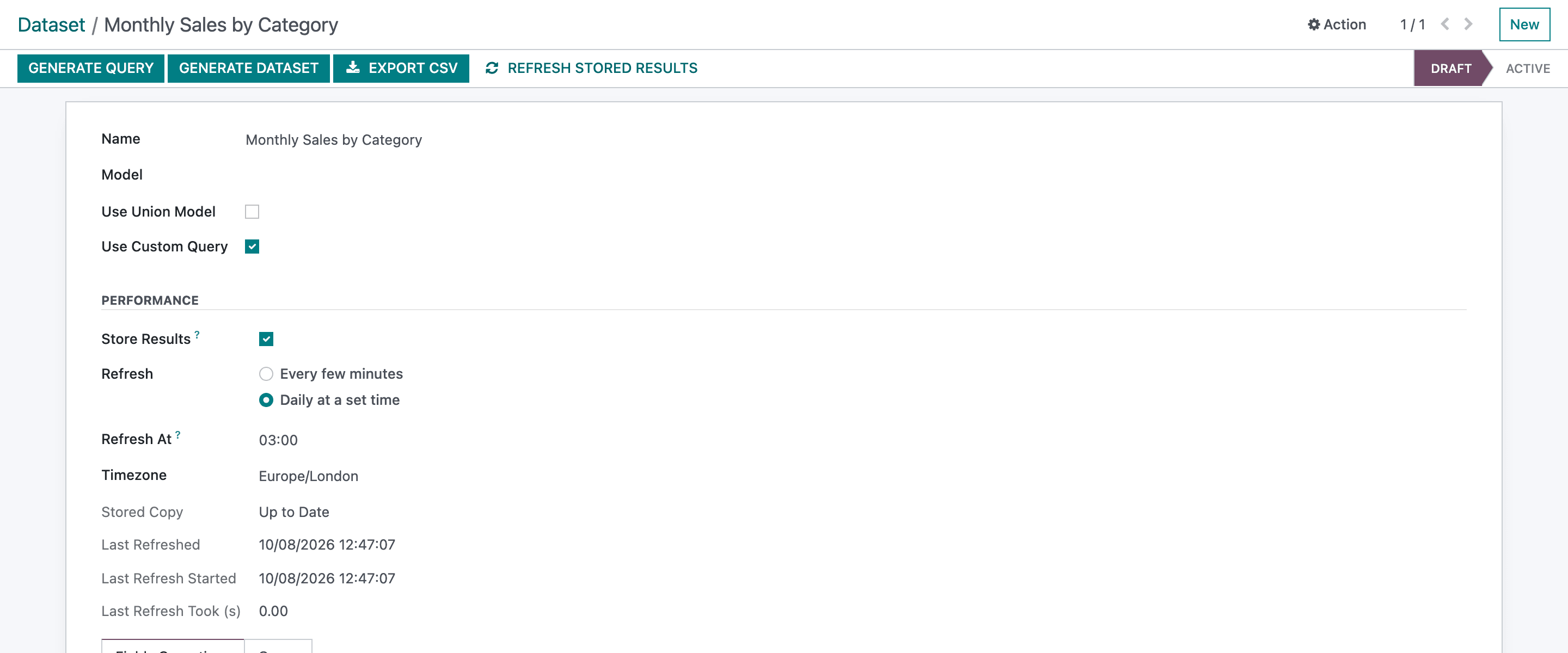
- Refresh Stored Results
- Store Results
- Stored Copy: the state of the copy
The first copy is built in the background, usually within a few minutes. Until it’s ready, widgets keep reading live data.
Watch the stored copy
Section titled “Watch the stored copy”The form shows the state of the copy:
| Field | Meaning |
|---|---|
| Stored Copy | Queued (waiting for the background job), Refreshing, Up to Date or Failed. |
| Last Refreshed | When the copy widgets read now was finished. |
| Last Refresh Started | When the last attempt began. |
| Last Refresh Took (s) | How long the last build took. |
| Last Refresh Error | Why the last attempt failed. Shown only after a failure. |
Refresh Stored Results in the header queues a rebuild now. It runs in the background, so the page doesn’t wait; reload the form to see the state change.
How refreshing works
Section titled “How refreshing works”- The new copy is built next to the old one and swapped in when it’s complete. Viewers never see an empty or half-built dataset; during a refresh they keep seeing the previous copy.
- A background job named Odoo Dashboards: refresh stored datasets runs every 5 minutes and rebuilds the datasets that are due, one at a time.
- Every few minutes counts from the last attempt, so a refresh that fails waits a full interval before trying again.
- Daily at a set time rebuilds at the first run after that time. A failed daily refresh is retried every hour.
- Date and datetime columns of the copy are indexed, so date filters stay fast.
Things to know
Section titled “Things to know”- Relative dates are frozen at refresh time. A Where Clause such as This month or Last 30 days, or
CURRENT_DATEin the SQL, is worked out when the copy is built. With a daily refresh, “today” in the copy is the day of the last refresh. - Changing the dataset drops the copy. Adding a column, editing the SQL and clicking Generate Dataset: the dataset serves live data again until the next copy is built, which is queued straight away.
- Turning it off switches the dataset straight back to live data and deletes the copy.
- Export CSV runs the dataset’s query live, not from the copy.
- Duplicating a dataset doesn’t copy the setting. Turn it on again on the copy.
- A stored dataset holds all its rows, so keep its SQL to the history you need.
- Datasets whose names map to the same view name can’t be stored: Another dataset uses the same view: generate this one before storing it. See Naming datasets.
Validation messages on save: A dataset that uses runtime parameters ({{as_at_date}}, {{date_from}}, {{int:…}}) is computed per request and can’t be stored., Stored results can be refreshed at most every 5 minutes., and The refresh time must be between 00:00 and 23:59.